You can help support this website by buying me a coffee!

For IT Admins - How to Disable Bing search in Windows 11 Start Menu using an Endpoint Manager configuration profile "Do Not Use Web Results"
Windows 11 will automatically show web results when you are searching for items in the Start menu.
To turn this off, you'll need to create an Endpoint manager configuration profile with "Do Not Use Web Results" set to "Not Allowed"

Microsoft Endpoint Manager admin center
Devices - Windows - Configuration profiles
Create profile
Platform: Windows 10
Profile type: Settings catalog

Create profile
Name: Windows 11 Start Menu Settings

Settings picker
Add settings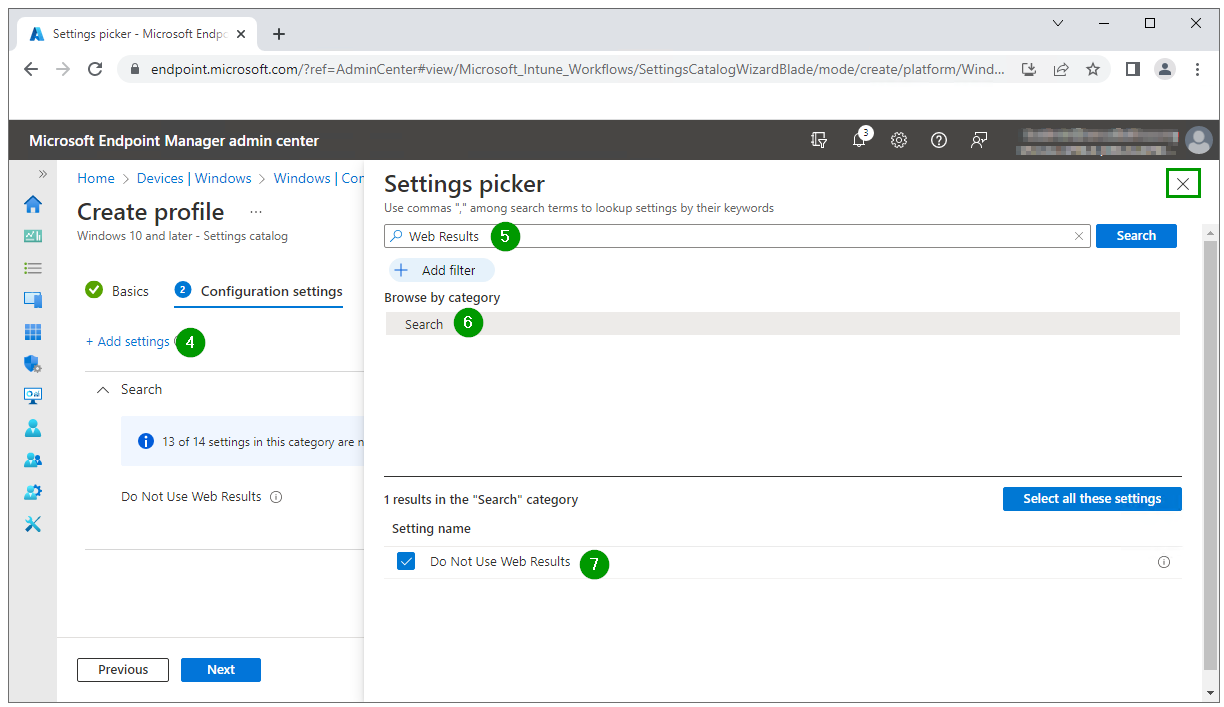
Configuration settings
Do not use web results: Not allowed

Assignments
Assign to Windows 11 dynamic device group

Review + create
Create profile


Take a look at this other guide for disabling Search in Bing in Office 365
Disable Microsoft Search in Bing in Office 365
https://techlabs.blog/categories/office-365/disable-microsoft-search-in-bing-in-office-365
Comments